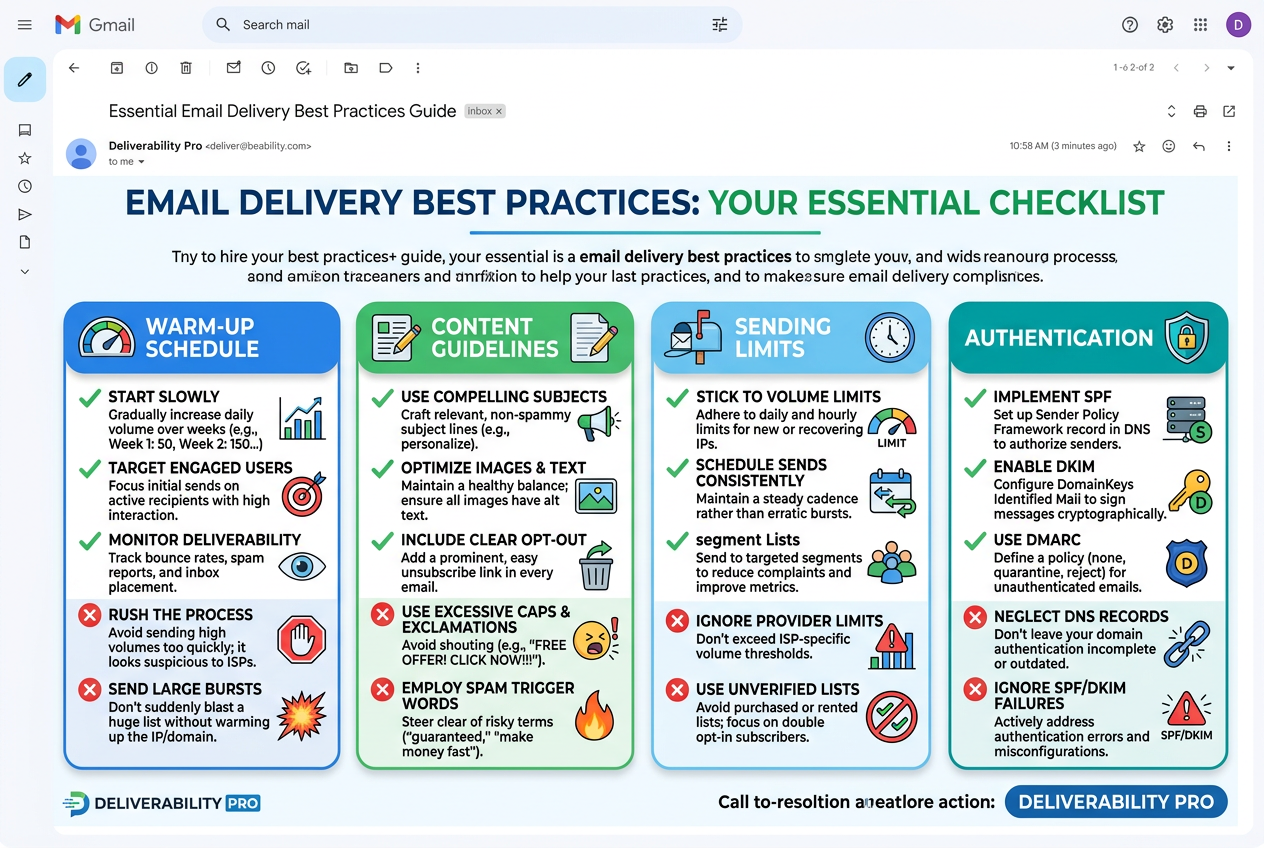
Follow these guidelines to maximize your email deliverability
Introduction
Email deliverability is critical for campaign success. Even the best-crafted emails won't generate results if they land in spam folders. This guide covers proven strategies to ensure your emails reach the inbox.
Email Warm-Up
What is Email Warm-Up?
Email warm-up is the process of gradually increasing your sending volume to establish a positive sender reputation with email providers (Gmail, Outlook, etc.). New domains or email addresses start with no reputation, so sudden high-volume sending triggers spam filters.
Why Warm-Up Matters
- Builds Sender Reputation: Email providers track your sending patterns. Consistent, low-volume sending builds trust.
- Improves Inbox Placement: Warmed-up emails are more likely to land in the primary inbox, not spam.
- Reduces Bounce Rates: Gradual warm-up helps identify invalid addresses before large campaigns.
Recommended Warm-Up Schedule
| Week | Daily Volume | Weekly Total | Notes |
|---|---|---|---|
| Week 1 | 10-20 emails | 70-140 | Start with engaged contacts only |
| Week 2 | 20-30 emails | 140-210 | Increase by 50% |
| Week 3 | 30-50 emails | 210-350 | Monitor bounce rates closely |
| Week 4 | 50-75 emails | 350-525 | Continue gradual increase |
| Week 5+ | 75-100+ emails | 525-700+ | Reach full sending volume |
Authentication & DNS Records
SPF (Sender Policy Framework)
SPF specifies which mail servers are authorized to send email on behalf of your domain. Without SPF, your emails are more likely to be marked as spam.
Example SPF Record:
v=spf1 include:_spf.google.com ~allThis record authorizes Google's mail servers (for Gmail) to send on your domain's behalf.
DKIM (DomainKeys Identified Mail)
DKIM adds a digital signature to your emails, proving they weren't tampered with in transit. Gmail automatically configures DKIM for custom domains.
To enable DKIM:
- Go to Gmail Settings → See all settings
- Navigate to the Accounts and Import tab
- Under Send mail as, click Edit info next to your custom domain email
- Follow the instructions to generate a DKIM key
- Add the TXT record to your domain's DNS settings
DMARC (Domain-based Message Authentication)
DMARC tells receiving servers what to do if an email fails SPF or DKIM checks. It also provides reports on your email authentication status.
Recommended DMARC Record (Monitoring Mode):
v=DMARC1; p=none; rua=mailto:dmarc-reports@yourdomain.comStrict DMARC Record (After Monitoring):
v=DMARC1; p=quarantine; rua=mailto:dmarc-reports@yourdomain.com✅ Best Practice: Set Up All Three
Configure SPF, DKIM, and DMARC for your domain before sending campaigns. This triple authentication significantly improves deliverability and protects against spoofing.
Content Optimization
Subject Line Guidelines
✅ Do:
- Keep subject lines under 50 characters
- Use clear, descriptive language
- Personalize with recipient's name when appropriate
- Test different subject lines with A/B testing
- Use sentence case (not ALL CAPS)
✗ Avoid:
- Spam trigger words: "FREE", "URGENT", "ACT NOW", "GUARANTEE"
- Excessive punctuation: "!!!", "???"
- All caps: "IMPORTANT ANNOUNCEMENT"
- Misleading subject lines that don't match content
- Overly salesy language: "BUY NOW", "DISCOUNT", "SAVE BIG"
Email Body Content
✅ Do:
- Personalize: Use merge fields like {{FirstName}} and {{Company}}
- Keep it concise: Aim for 50-150 words for cold outreach
- Use plain text: Avoid heavy HTML or image-only emails
- Include a clear CTA: One clear call-to-action per email
- Add value: Focus on recipient's needs, not your product
- Use proper grammar: Proofread or use DraftMerge's AI Grammar Checker
✗ Avoid:
- Large images or attachments (trigger spam filters)
- Too many links (more than 3-4 looks spammy)
- Shortened URLs (bit.ly, tinyurl — often blocked)
- HTML-heavy templates with tables and complex formatting
- Generic greetings: "Dear Sir/Madam", "To whom it may concern"
- Excessive formatting: colored text, multiple fonts, large signatures
Personalization Examples
Good (Generic):
Hi,

I noticed your company could benefit from our services.
Let me know if you're interested in learning more.

Best,
John
Better (Personalized):
Hi {{FirstName}},

I saw {{Company}} recently {{Trigger Event: raised funding / launched new product / posted on LinkedIn}}.
Congratulations! Based on your focus on {{Industry/Topic}},
I thought our {{Specific Solution}} might be relevant.

Would you be open to a 15-minute call next week?

Best,
John
Sending Practices
Optimal Sending Times
Email deliverability varies by day and time. General guidelines:
- Best Days: Tuesday, Wednesday, Thursday (mid-week)
- Best Times: 8-10 AM (recipient's time zone)
- Avoid: Monday mornings (inbox overload), Friday afternoons (low engagement), weekends
Sending Volume Limits
Respect email provider limits to avoid being flagged as spam:
- Gmail (Personal): 500 emails per day
- Gmail (Workspace): 2,000 emails per day
- Outlook/Hotmail: 300 emails per day
- Yahoo: 500 emails per day
Recommendation: Stay well below these limits. For cold outreach, aim for 50-100 emails per day per account to maintain high deliverability.
Bounce Rate Management
Keep your bounce rate below 2% to maintain sender reputation:
- Hard Bounces: Remove immediately (invalid email, domain doesn't exist)
- Soft Bounces: Monitor — remove after 3 consecutive soft bounces (full inbox, server down)
✗ Warning Signs
If you notice any of these, pause your campaign and review your list:
- Bounce rate above 5%
- Spam complaints (recipients marking as spam)
- Unsubscribe rate above 1%
- Open rate below 10% (indicates poor targeting or subject lines)
List Hygiene
Regular List Cleaning
Clean your contact list every 30-90 days to maintain high deliverability:
- Remove hard bounces immediately
- Delete inactive contacts (no opens/clicks in 6+ months)
- Verify email addresses before large imports
- Remove duplicate entries
- Update outdated contact information
- Segment engaged vs. unengaged contacts
Permission-Based Lists
Only send to contacts who have opted in:
✅ Acceptable Sources:
- Website sign-up forms with explicit consent
- Business cards collected at events (with permission)
- Existing customers or clients
- LinkedIn connections who agreed to receive emails
- Referrals from mutual contacts
✗ Unacceptable Sources:
- Purchased or rented email lists
- Scraped email addresses from websites
- Third-party lists without explicit opt-in
- Old lists from previous jobs or companies
Double Opt-In
For highest-quality lists, use double opt-in:
- Contact signs up via your website or form
- DraftMerge sends a confirmation email with a verification link
- Contact clicks the link to confirm subscription
- Only then are they added to your active list
This ensures contacts genuinely want to receive your emails, reducing spam complaints and improving engagement.
Monitoring & Analytics
Key Metrics to Track
Monitor these metrics to identify deliverability issues:
| Metric | Good | Warning | Critical |
|---|---|---|---|
| Delivery Rate | > 98% | 95-98% | < 95% |
| Open Rate | > 20% | 15-20% | < 15% |
| Reply Rate | > 3% | 1-3% | < 1% |
| Bounce Rate | < 2% | 2-5% | > 5% |
| Unsubscribe Rate | < 0.5% | 0.5-1% | > 1% |
| Spam Complaints | 0 | 1-2 | > 2 |
Using DraftMerge Dashboard
The DraftMerge Dashboard provides real-time analytics for all your campaigns:
- Delivery Metrics: Track sent, delivered, bounced, and opened emails
- Engagement Metrics: Monitor reply rates, click-through rates, and conversions
- Trend Analysis: View performance over time to identify patterns
- Campaign Comparison: Compare A/B test results side-by-side
Avoiding Spam Filters
Common Spam Triggers
✗ Content Triggers:
- Excessive use of sales language: "BUY NOW", "FREE", "DISCOUNT"
- ALL CAPS text
- Multiple exclamation marks: "!!!"
- Spam trigger words: "URGENT", "ACT NOW", "GUARANTEE", "RISK-FREE"
- Misleading subject lines
- Hidden text or fonts (white text on white background)
✗ Technical Triggers:
- Missing SPF, DKIM, or DMARC records
- Sending from a new domain without warm-up
- High bounce rates (> 5%)
- Spam complaints from recipients
- Sending to spam trap addresses (purchased lists)
- Using shared IPs with poor reputation
Spam Score Testing
Before sending large campaigns, test your email's spam score:
- Open DraftMerge extension
- Create a test email with your template
- Click Spam Score Test (available in Pro and Enterprise plans)
- Review the score and recommendations
- Adjust content based on feedback
- Re-test until score is below 3.0 (good)
Reputation Management
Sender Reputation Factors
Email providers calculate your sender reputation based on:
- Authentication: SPF, DKIM, DMARC setup
- Engagement: Open rates, reply rates, click-through rates
- Complaints: Spam complaints and unsubscribe requests
- Bounce Rate: Percentage of undeliverable emails
- Volume Consistency: Regular, predictable sending patterns
- List Quality: Permission-based, engaged contacts
Improving Poor Reputation
If your sender reputation has dropped:
- Pause Campaigns: Stop sending for 1-2 weeks
- Clean Your List: Remove all inactive, bounced, and unengaged contacts
- Re-engage: Send a re-engagement campaign to inactive contacts
- Restart Slowly: Begin with 5-10 emails per day to engaged contacts
- Monitor Closely: Track metrics daily for the first week
- Gradually Increase: Follow the warm-up schedule above
✅ Long-Term Reputation Building
- Send consistently (same volume, same schedule)
- Focus on engaged contacts only
- Provide value in every email
- Make unsubscribing easy (reduces spam complaints)
- Monitor feedback loops (spam complaints)
- Use dedicated IPs for high-volume sending (Enterprise plans)
Compliance & Legal
CAN-SPAM Act (United States)
Follow these requirements for commercial emails:
- Include your physical mailing address in every email
- Provide a clear, working unsubscribe mechanism
- Honor unsubscribe requests within 10 business days
- Don't use deceptive subject lines or sender information
- Identify the message as an advertisement (if applicable)
GDPR (European Union)
For EU recipients, ensure compliance with:
- Obtain explicit consent before sending (opt-in)
- Provide clear privacy policy and data handling information
- Allow easy access to view, update, or delete personal data
- Include unsubscribe link in every email
- Document consent and maintain records
CASL (Canada)
Canadian Anti-Spam Legislation requires:
- Express or implied consent to send commercial emails
- Clear identification of sender
- Working unsubscribe mechanism
- Unsubscribe within 10 business days
Troubleshooting Deliverability Issues
Emails Going to Spam
If your emails are landing in spam folders:
- Check SPF, DKIM, and DMARC records
- Review content for spam trigger words
- Verify your domain reputation (use tools like MXToolbox)
- Check if your IP is blacklisted
- Reduce sending volume and re-warm your domain
- Ask recipients to whitelist your email address
Low Open Rates
If open rates are below 15%:
- A/B test subject lines
- Personalize subject lines with recipient's name
- Optimize send times (test different days/hours)
- Segment your list for targeted messaging
- Clean your list — remove inactive contacts
- Check if emails are going to spam or promotions tab
High Bounce Rates
If bounce rate exceeds 5%:
- Pause the campaign immediately
- Verify email addresses using an email validation service
- Remove all hard bounces from your list
- Check for typos or formatting errors in your import file
- Review your data sources — are you using permission-based lists?
- Restart with a smaller, verified list
Spam Complaints
If recipients mark your emails as spam:
- Stop sending immediately
- Review your list sources — did these contacts opt in?
- Check your content for misleading or aggressive language
- Ensure unsubscribe link is prominent and working
- Remove complainers from your list permanently
- Consider using a re-engagement campaign before resuming